Version: 9.4.0
Build Date: 2026.0331
Released: 14 April 2026
Requirements:
Windows: 10, 11
Mac OS: 11.4 (Big Sur) or later
Linux: Centos 7.9 and compatible distributions
Plug-in Connection Requirements:
3ds Max - 2025, 2026, 2027 - Plug-in build 2026.0327 New Release Notes
Blender - 3.6.12 LTS and higher (inc Apple Silicon support) - Plug-in build 2026.0324 New Release Notes
Cinema 4D - 2023, 2024, 2025, 2026 (inc Apple Silicon support) - Plug-in build 2025.0518 Release Notes
DELTAGEN - 2019x and higher, Stage 2019x and higher - Plug-in build for 2026x New 2026.0212 Release Notes
Houdini - 19.5, 20, 20.5, 21 (with Python 2.7, 3.7, 3.9, 3.11) (inc Apple Silicon support 19.5+) - Plug-in build 2026.0518 New Release Notes
LightWave 3D - 2018, 2019, 2020 - Plug-in build 2022.0513
Maya - 2025, 2026, 2027 - Plug-in build 2026.0327 New Release Notes
MODO - 15, 16, 17 (Windows and OSX) - Plug-in build 2024.0318 Release Notes
Octane Standalone: 2024.1, 2025.2 (Windows only) , Plug-in build 2025.0609 Release Notes
Omniverse - Create 2023.2.2 and higher (now called Omniverse Kit) (Windows only) - Plug-in build 2026.0526 New Release Notes
Rhino 6, 7, 8 (Windows only) - Plug-in build 2024.0307 Release Notes
Unreal Engine - 5.5, 5.6.1, 5.7.1 - Plug-in build 2025.1225 Release Notes
Maxwell Studio - 5 (Windows only) - No additional plug-in installation required
Patchwork 3D 2023 - Windows - No additional plug-in installation required
SOLIDWORKS Visualize - 2017 and higher (Windows) - No additional plug-in installation required
VRED - 2025.2, 2026 - Additional Plug-in Installation Required Plug-in build 2025.1014 Release Notes
Updated Omniverse Plug-in (Released 2 June 2026)
Build - 2026.0526
Omniverse changed their default Dome Light orientation. This release fixes the incorrect orientation for releases 109 and later.
Tested with Omniverse Kit 106.5, 107.3 108.0, 109, 110.1
Updated Houdini Plug-in (Released 27 May 2026)
Build - 2026.0518
Fixed load warnings when reopening a Houdini scene lit using HDR Light Studio.
Redshift: Alpha support added to area light textures.
Arnold: Camera visibility setting in HDR Light Studio now honoured.
Octane: Resolved area light issues in Octane versions prior to 2025, now working correctly with alpha support. Fixed an issue where an additional area light was created when restarting the connection.
Tested against these renderer versions:
•Mantra (bundled with Houdini)
•Arnold 6.4.6.1 (H21.0.596)
•Octane 2025/2026 (H21.0.559)
•Redshift 2026.3.1 (H21.0.596)
•RenderMan 27.2 (H21.0.559)
•V-Ray 7.20.10 (H21.0.512)
Blender 5.1 support added (Released 12 May 2026)
Build - 2026.0324
Support added for Blender 5.1. The existing add-on became incompatible due to Blender's Python being updated from 3.11 to 3.13.
Important notes for Blender 5.1 users:
•macOS users, please stick with Blender 5.0 and don't use HDR Light Studio with Blender 5.1. There has been a breaking change preventing the Blender viewport from streaming into the HDR Light Studio UI. We are working with Blender to try to get this resolved.
•Known issue: with Octane Addon 31.6, HDRI map updates are not coming through.
DELTAGEN 2026x and DELTAGEN Stage 2026 support added (Released 7 May 2026)
Build - 2026.0212
Support added for DELTAGEN 2026x and DELTAGEN Stage 2026.
Fixed a hang on exit that could occur when the HDR Light Studio DELTAGEN connection was loaded but never used during the session.
3ds Max 2027 support added (Released 1 May 2026)
Bug Fixes and Updates: Build - 2026.0327
Support added for 3ds Max 2027
3ds Max - Arnold: Camera Visibility setting in HDR Light Studio is now respected on Area Lights.
3ds Max - Redshift: Area Lights now support Alpha. Spread setting is now fixed.
3ds Max - FStorm: Environment is now correctly set to emission 1. Area Lights now support Alpha.
3ds Max: When exporting a scene to HDR Light Studio, the file name is now correctly amended to match the export format.
Maya 2027 support added (Released 1 May 2026)
Bug Fixes and Updates: Build - 2026.0327
Support added for Maya 2027
Redshift: Area Lights now support Alpha. Spread setting is now fixed.
RenderMan: HDR Light Studio Spread setting is now tied to Cone Angle.
Fixed a bug where closing the HDR Light Studio UI could sometimes fail to store the latest lighting design in Maya.
Release Note for Maya/Arnold
Known issue: Maya may become unresponsive when interacting with the Arnold RenderView while streaming to HDR Light Studio - for example, using IPR refresh, pressing stop, or closing the window.
Workaround: While streaming is active, avoid interacting with the Arnold RenderView in Maya. Use the controls in HDR Light Studio to start and stop streaming instead.
What's New in HDR Light Studio 9 Drop 4 (Released 14 April 2026)
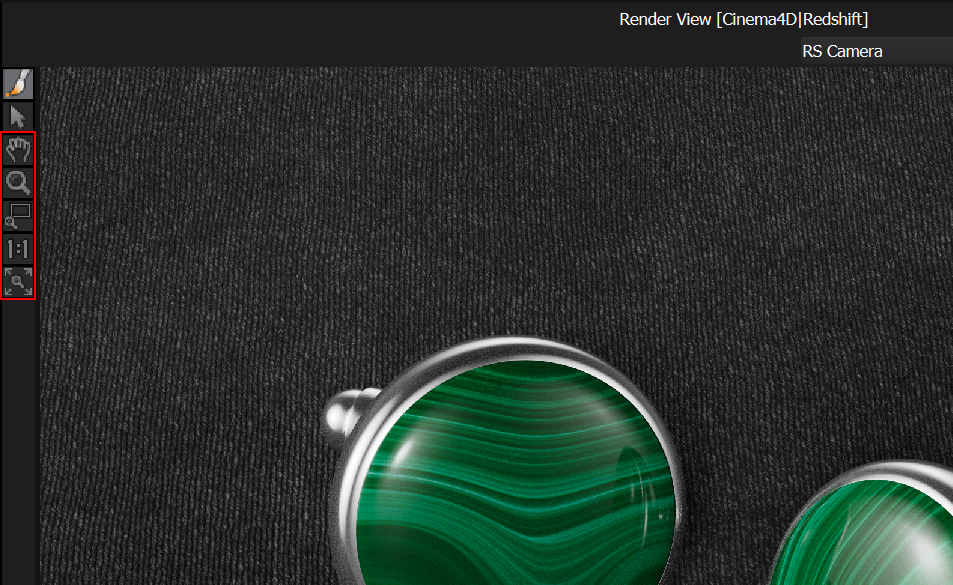
New View Controls in the Streaming Render View
Being able to navigate this streamed image makes a real difference - whether you're zooming into fine details, repositioning to place lights with precision, or examining reflections up close. With this release, the Streaming Render View now includes full navigation controls: zoom, pan, region zoom, 1:1 pixel view, and fit-to-view. For quick navigation while other tools are active, middle mouse scroll zooms the view and middle mouse button pans - so you never need to switch tools just to re-frame. Read more.
Optimized Speed of Streaming Render View
The streaming Render View is now noticeably faster thanks to significant performance optimizations.
Render View (HDR Light Studio) - Updated Default Settings
The built-in Render View now ships with updated defaults that take advantage of modern hardware: resolution has been bumped to 600 × 450, samples increased to 160, and Fast Mode is now enabled by default for area lights. The result is a noticeably higher quality preview that still feels fast and interactive. The previous defaults dated back to 2015 - it was time for a refresh.
Isolate Selected Lights
HDR Light Studio has always let you solo individual lights from the Light List, but now that control is available as a keyboard shortcut too. Press 'S' at any time to solo the currently selected lights, temporarily hiding all others - and press 'S' again to restore them. This is especially useful when you're in the middle of moving or adjusting a light and want to quickly isolate it to see its true effect on the scene. No need to move the mouse back to the Light List and click - just tap the 'S' key to isolate that light and keep working.
Cancel Button for Production Rendering
Previously, once you started a high-resolution production render, you had to wait for it to finish before you could do anything else. You can now cancel a production render in progress at any time, stopping it at the earliest opportunity so you can get back to work.
Drag and Drop to Open Projects
HDR Light Studio project files (HDi) can now be opened by dragging and dropping them straight onto the interface - a quick, convenient alternative to using the file menu.
Collapse to New Light Look
Right-click on a child Light Look to collapse the full hierarchy of parents and children into a new additional single flat Light Look.
Rename Light Looks from Right-Click Menu
Light Looks can now be renamed directly from the right-click menu, making this option much easier to find. Previously, renaming required a double-click - something many users never discovered.
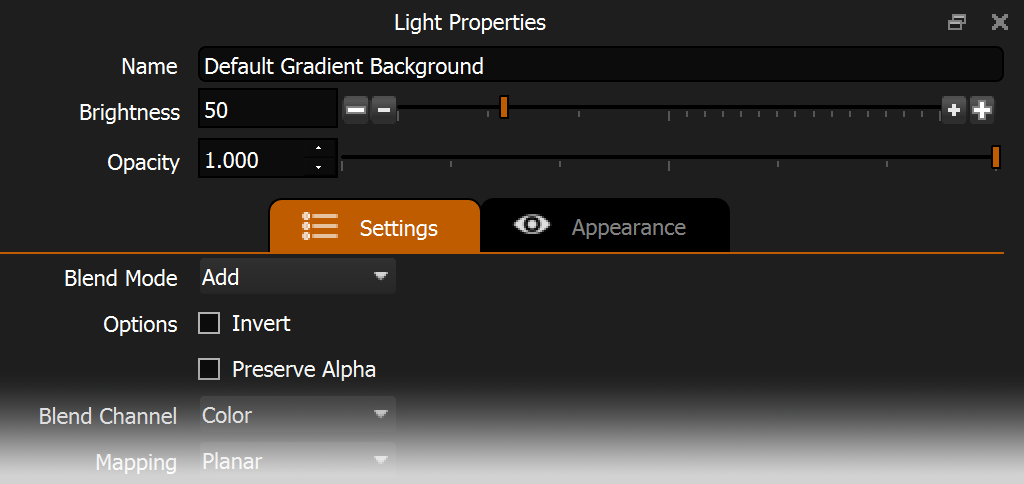
Light Properties UI Refresh
The Settings and Appearance tabs have been given more visual prominence, reflecting how frequently they're used. Property layouts have also been tidied up for a cleaner, more intuitive interface.
Dark Light Tools Bar Light - Improved Settings
The Dark Light now has smarter default settings that prevent unwanted side effects. It no longer affects alpha channels or color, so it works purely as intended - darkening areas without introducing artifacts.
Motion Blur Advanced - Drag and Drop Image Support
The Mask Image slot now supports drag and drop, bringing it in line with other image slots across the interface.
Bug Fixes:
Properly handles LightPaint clicks and releases outside of streaming image space.
Omniverse - Now handles streaming image re-size without errors.
Now all application settings are properly reset when Resetting in Preferences panel.