Build Date: 2025.1230
Released: 11 Feb 2026
Requirements:
Windows: 10, 11
Mac OS: 11.4 (Big Sur) or later
Linux: Centos 7.9 and compatible distributions
Plug-in Connection Requirements:
3ds Max - 2023, 2024 - Plug-in build 2024.1105 Release Notes
3ds Max - 2025, 2026 - Plug-in build 2025.0915 Release Notes
Blender - 3.6.12 LTS and higher (inc Apple Silicon support) - Plug-in build 2025.1120 New Release Notes
Cinema 4D - 2023, 2024, 2025, 2026 (inc Apple Silicon support) - Plug-in build 2025.0518 Release Notes
DELTAGEN - 2019x and higher, Stage 2019x and higher - Plug-in build for 2025x 2024.1218 Release Notes
Houdini - 19.5, 20, 20.5, 21 (with Python 2.7, 3.7, 3.9, 3.11) (inc Apple Silicon support 19.5+) - Plug-in build 2025.0908 Release Notes
LightWave 3D - 2018, 2019, 2020 - Plug-in build 2022.0513
Maya - 2022, 2023, 2024, 2025, 2026 - Plug-in build 2024.0327 Release Notes
MODO - 15, 16, 17 (Windows and OSX) - Plug-in build 2024.0318 Release Notes
Octane Standalone: 2024.1, 2025.2 (Windows only) , Plug-in build 2025.0609 Release Notes
Omniverse - Create 2023.2.2 and higher (now called Omniverse Kit) (Windows only) - Plug-in build New 2025.0225 Release Notes
Rhino 6, 7, 8 (Windows only) - Plug-in build 2024.0307 Release Notes
Unreal Engine - 5.5, 5.6.1, 5.7.1 - Plug-in build 2025.1225 New Release Notes
Maxwell Studio - 5 (Windows only) - No additional plug-in installation required
Patchwork 3D 2023 - Windows - No additional plug-in installation required
SOLIDWORKS Visualize - 2017 and higher (Windows) - No additional plug-in installation required
VRED - 2025.2, 2026 - Additional Plug-in Installation Required Plug-in build 2025.1014 Release Notes
17th March 2026
Updated Omniverse plug-in to address NumPy version change.
•Resolved an issue affecting connections running NumPy v2.x (such as Omniverse 109) where the plugin would fail to operate correctly due to a conflict with the internal API module. The plugin has been updated to ensure compatibility with the latest versions of NumPy.
•Fixed a spurious error message that appeared in the console on plugin load. This was a cosmetic issue and did not affect functionality, but has now been resolved to keep your output log clean.
9.3.2 Minor Release
This release contains a critical Bug Fix:
•Area lights were being incorrectly included on the HDRI map production render. This release fixes that bug.
9.3.1 Minor Release
What's New
Unreal 5.7.1 Plug-in Release
Release Notes
This release contains important Bug Fixes:
•HDR Light Studio now correctly informs users when they are using the low resolution demo presets with a message in the Presets panel.
•Undo after LightPaint operations in the Render Views has been fixed.
•Deleting Lumi-Curve points in the Editor has been fixed.
•Undo in the Lumi-Curve Editor has been fixed.
•DELTAGEN: Fixed a bug where not using the HDR Light Studio UI when our plug-in had loaded caused DELTAGEN to hang on exit.
•Unreal 5.6.1 and 5.7.1: Fixed an issue where over time Unreal would grind to a halt due to area light texture updates.
•Unreal: Fixed an issue where area lights would disappear after texture updates.
What's New in HDR Light Studio 9 Drop 3
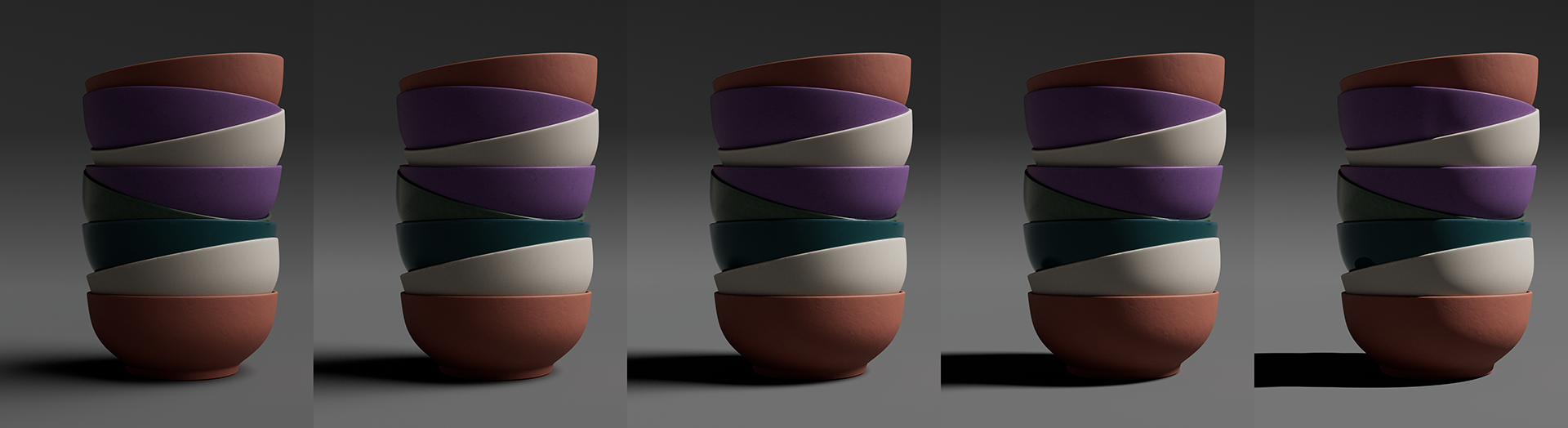
Energy Conserving Light Scaling
Maintain Perfect Exposure While Shaping Your Light
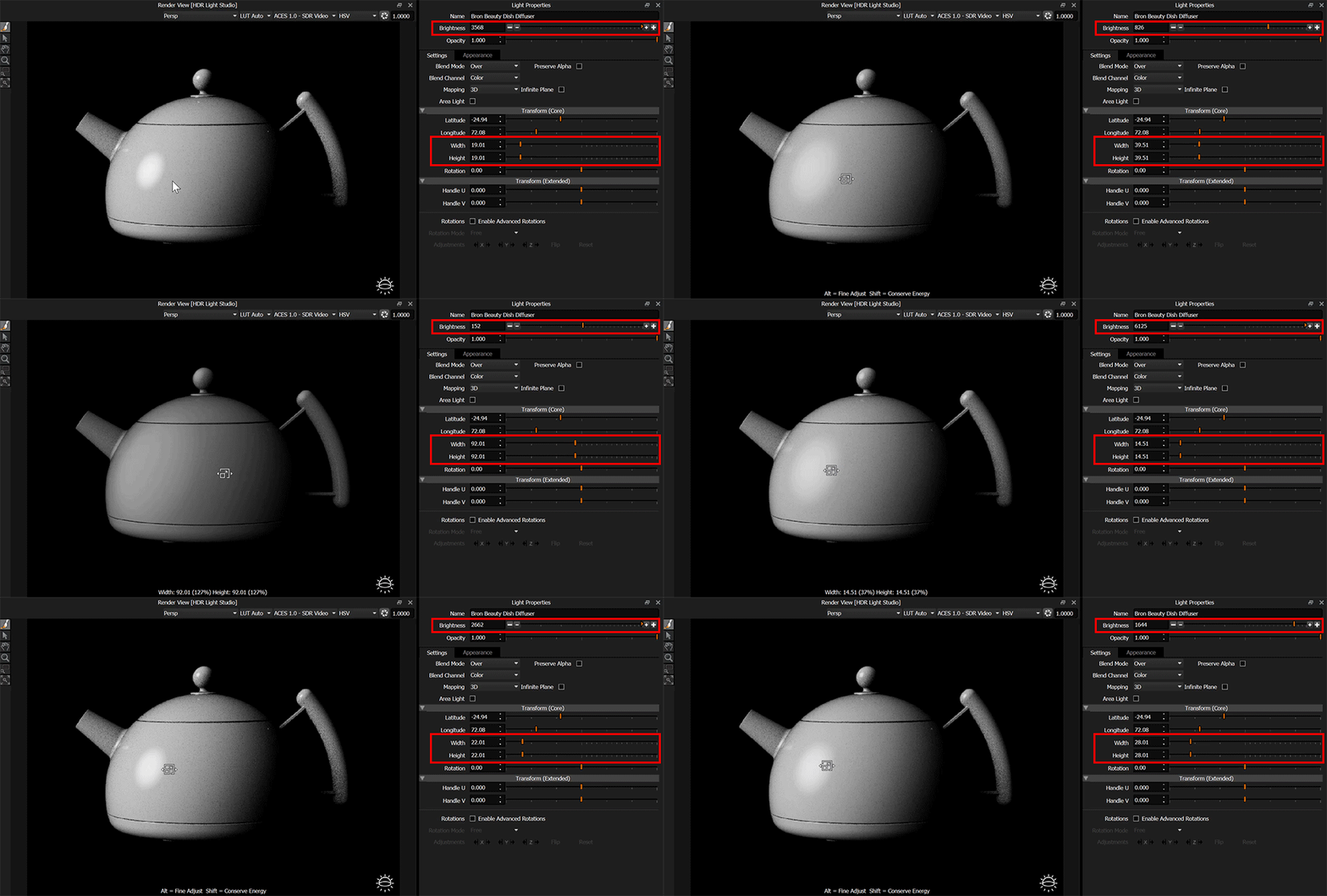
Ever wanted to soften a shadow without completely rebalancing your lighting? Now you can. Hold Shift while resizing a light in the Render Views or Canvas, and its intensity automatically adjusts to maintain consistent energy output, keeping illumination levels stable throughout your shot.
Why This Matters for Your Lighting Workflow
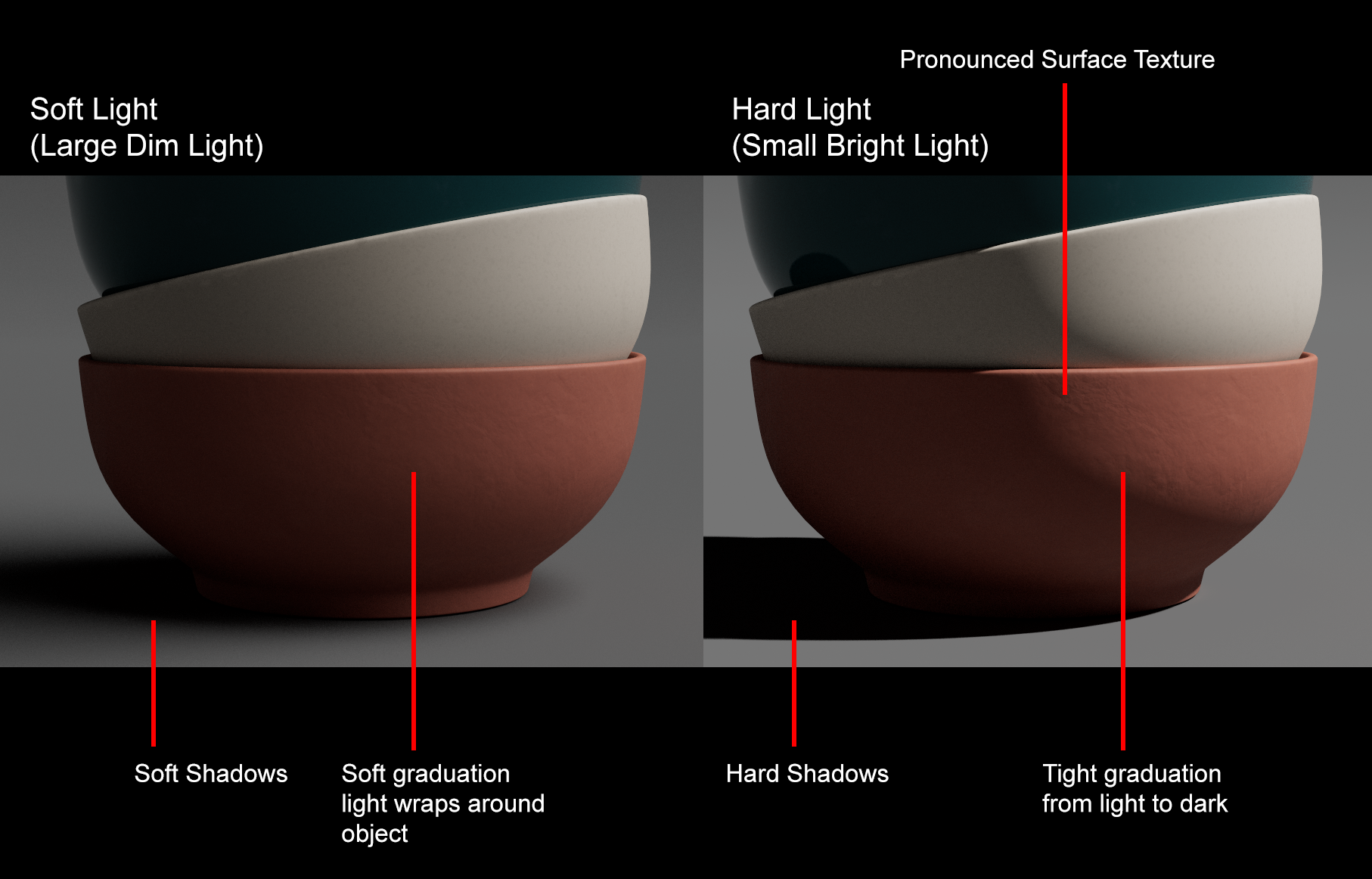
When lighting diffuse objects, you're constantly balancing three critical qualities: how the light wraps around your subject, the hardness of the light-to-shadow transition, and the sharpness of the shadows themselves. Harder, more defined shadows reveal surface textures with greater clarity, while softer shadows create smoother, more forgiving illumination.
Traditionally, adjusting light size to control these qualities meant constantly fighting a secondary problem: the larger you make a light source, the brighter it becomes, and vice versa. This forces you into an endless cycle of tweaking both size and intensity, making it difficult to isolate the creative decision you're actually trying to make.
Creative Freedom Without the Technical Distraction
By holding Shift, the software handles the technical compensation automatically. As you scale your light larger to soften shadows, the brightness decreases proportionally to maintain the same total energy output. Scale it smaller for harder shadows, and the intensity increases accordingly.
This means you can explore creative lighting choices purely on their artistic merit - experimenting with shadow hardness, wrap, and texture reveal - without the overhead of simultaneously managing exposure levels. The illumination stays consistent while you shape the quality of light, letting you focus entirely on the look you're after.
What else is new in 9 Drop 3?
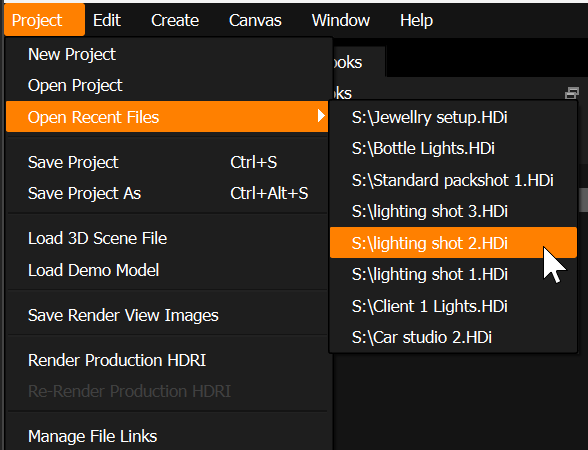
Open Recent Files
The Project Menu now includes an "Open Recent Files" option, allowing you to quickly access recently saved HDR Light Studio project files.
Increased Light Name Character Limit
Light names can now contain up to 63 characters, double the previous limit of 31. This allows for more descriptive naming conventions.
Pan and Zoom in the Render View (HDR Light Studio)
Use the middle mouse button to pan and the scroll wheel to zoom in the Render View (HDR Light Studio).
Simple and Standard Short Cuts
Keyboard shortcuts for Copy, Cut, Paste, Delete have been simplified to standard software shortcuts.
Copy = CTRL + C
Cut = CTRL + X
Paste = CTRL + V
Delete = Delete Key
(CMD instead of CTRL for macOS)
Updated to OpenColorIO release (2.5.0)
HDR Light Studio now ships with the default hdrlightstudio OCIO config, ACES 1.3, and ACES 2.0.
Improved error handling for missing OCIO settings/configs.
Optimized Texture Update Performance
Optimized texture updates to eliminate redundant HDRI map refreshes, resulting in a smoother and more responsive rendering experience with fewer unnecessary render restarts.
Plug-in Updates
Blender plug-in adds support for Blender 5
Bug Fixes:
•Production Render slowdown has been fixed by updating to a newer OpenImageIO version.
•Fix to ensure any pop up dialog panels are never drawn off screen. Prevents UI being locked as a result of hidden panels.
•When you first open the Lumi-Curve editor dialog, the Lightpaint tool for the adding Lumi-Curve points is not available until you do something in the editor panel itself. It is now available from the moment you open the bezier dialog editor.
•VRED - fixed an issue with HDR Light Studio not closing and hanging.