Updated in HDR Light Studio 9 Drop 5
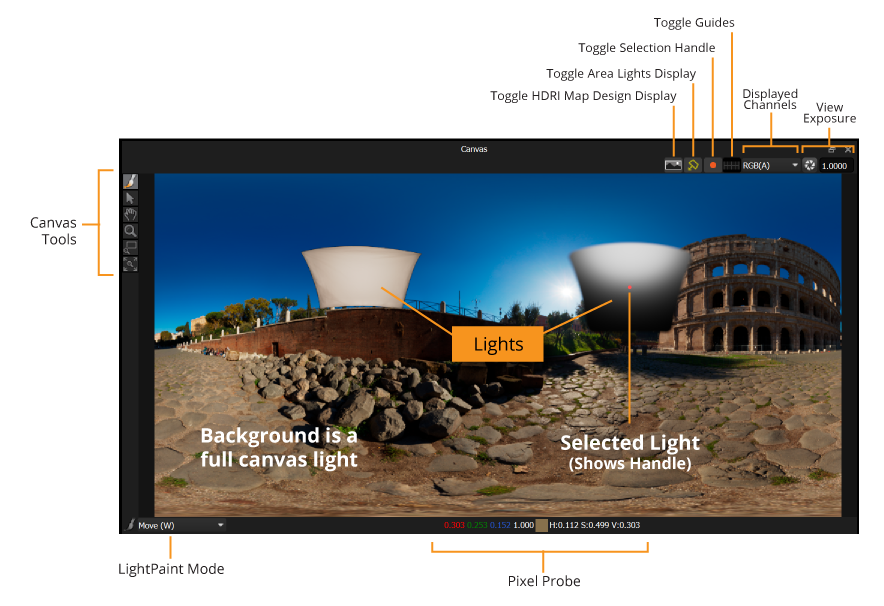
The Canvas shows your HDRI map design alongside the 3D Area Lights (viewed from the world center) which are drawn for context but aren't part of the HDRI map itself.
Previously, Area Lights were composited into the Canvas view based on their position in the Light List, so a light above them could obscure or tint them. This only affected the Canvas preview, never the actual scene lighting.
From HDR Light Studio 9 Drop 5, the Canvas always draws Area Lights on top of the HDRI map design, regardless of Light List order. Draw order between Area Lights is set by their distance from the origin.
LightPaint on Canvas
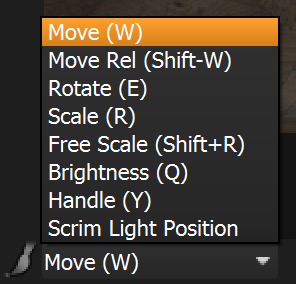
The LightPaint drop-down controls what attributes are controlled by clicking/dragging in the Canvas panel. This defaults to 'Move'. If the cursor is within the Canvas panel, use the keyboard shortcuts to switch between LightPaint modes for the Canvas only.