There are 4 additional canvas settings available from the Canvas menu and as buttons at the top of the Canvas.
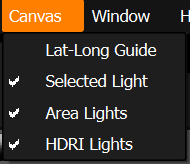
Menu
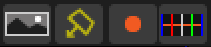
Buttons
HDRI Lights (New in 9 Drop 5)
Shows and hides the HDRI map design on the Canvas, letting you focus on the Area Lights in isolation.
Area Lights (New in 9 Drop 5)
Shows and hides the Area Lights on the Canvas, so you can work on the HDRI map design without them covering the map.
Selected Light - turn this on to display the orange selection handle in the middle of the selected light. This is on by default. You may want to turn this off if the orange handle is obscuring your view of the pixels in the center of the light. The selection handle denotes the position by which the light is being placed. When you move the light, this locator is moved to the new position.
Lat-Long Guide - turn this on to display guide lines on the canvas, they are only an overlay and not included in the HDRI map design. These guides can be helpful as they show the horizon line and a vertical lines at 0, 90, 180, 270, 360 degrees. They are off by default.